
A new open-source GIS written in Rust runs natively and in the browser, starts in a fraction of a second, and treats every button as a scriptable command. Four releases appeared in thirteen days. We read the code, tested RustGIS 0.4 against QGIS and plain Python, and found a young tool with an unusually solid core and some clear rough edges.
Most open-source desktop GIS share the same foundations: GDAL for reading data, PROJ for coordinates, Qt or a web view for the interface. RustGIS replaces almost all of that with code written in Rust. It reads GeoPackage, GeoParquet, FlatGeobuf, Shapefile, GeoTIFF and COG with its own readers, draws maps on the GPU through wgpu, and compiles the whole application to WebAssembly, so the same program runs at web.rustgis.app with nothing to install. GDAL and DuckDB become optional extras on the desktop rather than requirements.
The project comes from opengeos, the organisation of Qiusheng Wu, best known for the Python packages geemap and leafmap. Version 0.1.0 appeared on 12 October 2026, three more releases followed by 25 October, and the repository passed roughly 2,000 stars and 280 forks within its first two weeks.
How it is built. The project README states that RustGIS is “primarily built with Claude Opus 5.5, an AI model by Anthropic, working under human direction and review”, and asks users to check results for their own use. That explains part of the release pace, and it is one more reason to test outputs rather than take them on trust, which is what the benchmark below does.
Four releases in thirteen days
Everything is a command
The design decision that matters most for professional users is not the language. Every action in RustGIS, every ribbon button and menu item, is an engine command with an id and JSON parameters. Version 0.4.0 exposes 497 of them. The ribbon, the command line, the Python package, the AI assistant and external AI agents all call the same commands, so a workflow clicked together in the desktop app can be repeated from a script without translation.
The code is split into layered crates, each depending only on the layers below it. That is what lets the same engine run headless on a server, inside a Jupyter kernel, as a desktop app and in a browser tab.
Inside RustGIS: the crate stack
Highlighted: the engine layer that the command line and Python package expose.
From the architecture table in the RustGIS README (v0.4.0).
Same terrain, two interfaces
RustGIS borrows its layout from ArcGIS Pro rather than QGIS: a ribbon with tabs ordered by workflow (Home, Data, Style, Edit, Analyze, View, Publish), a Layers pane on the left and context panes on the right. Here is the same Copernicus GLO-30 elevation tile over the Karkonosze mountains (Poland, Czech Republic) in both programs.
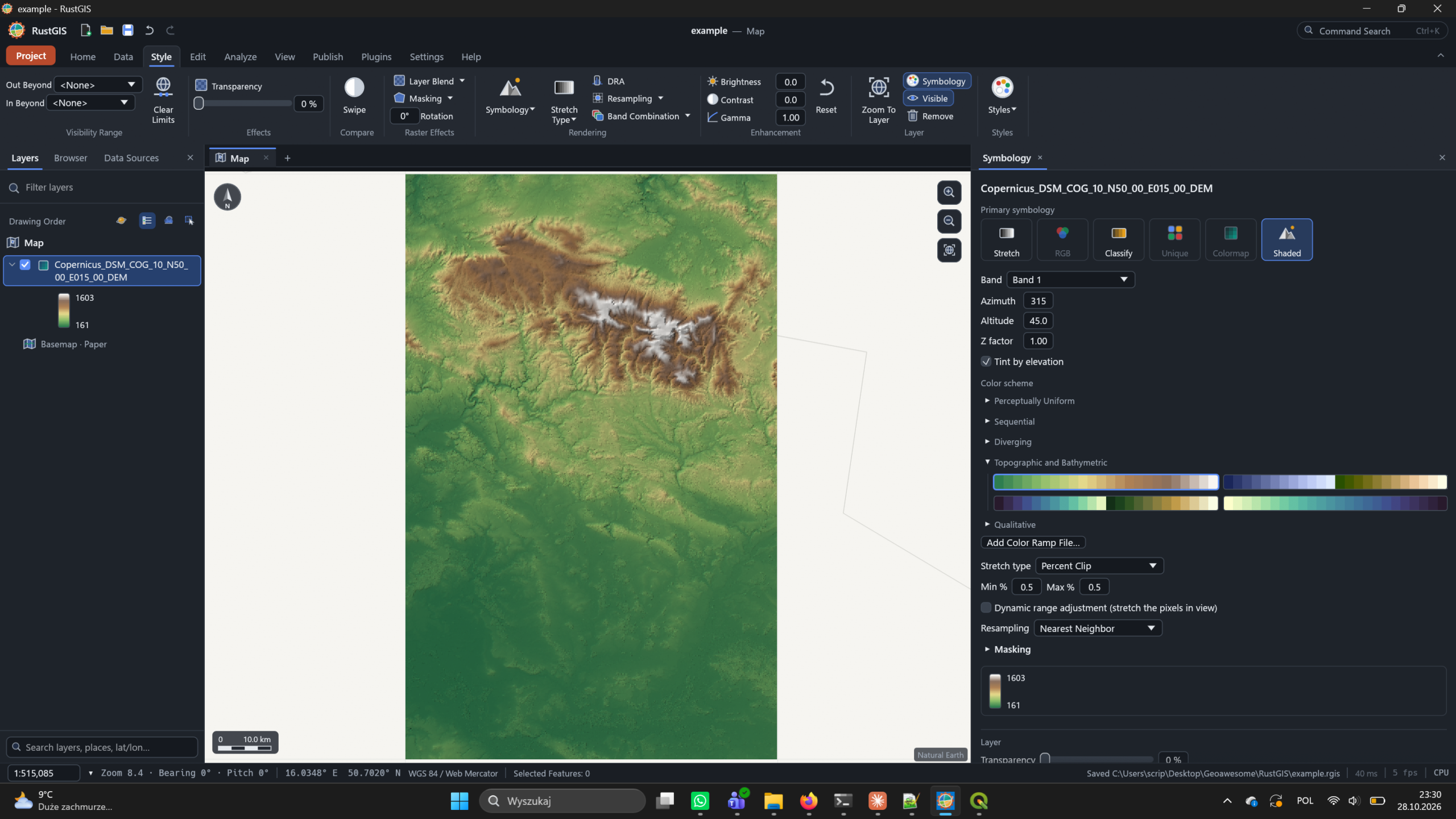
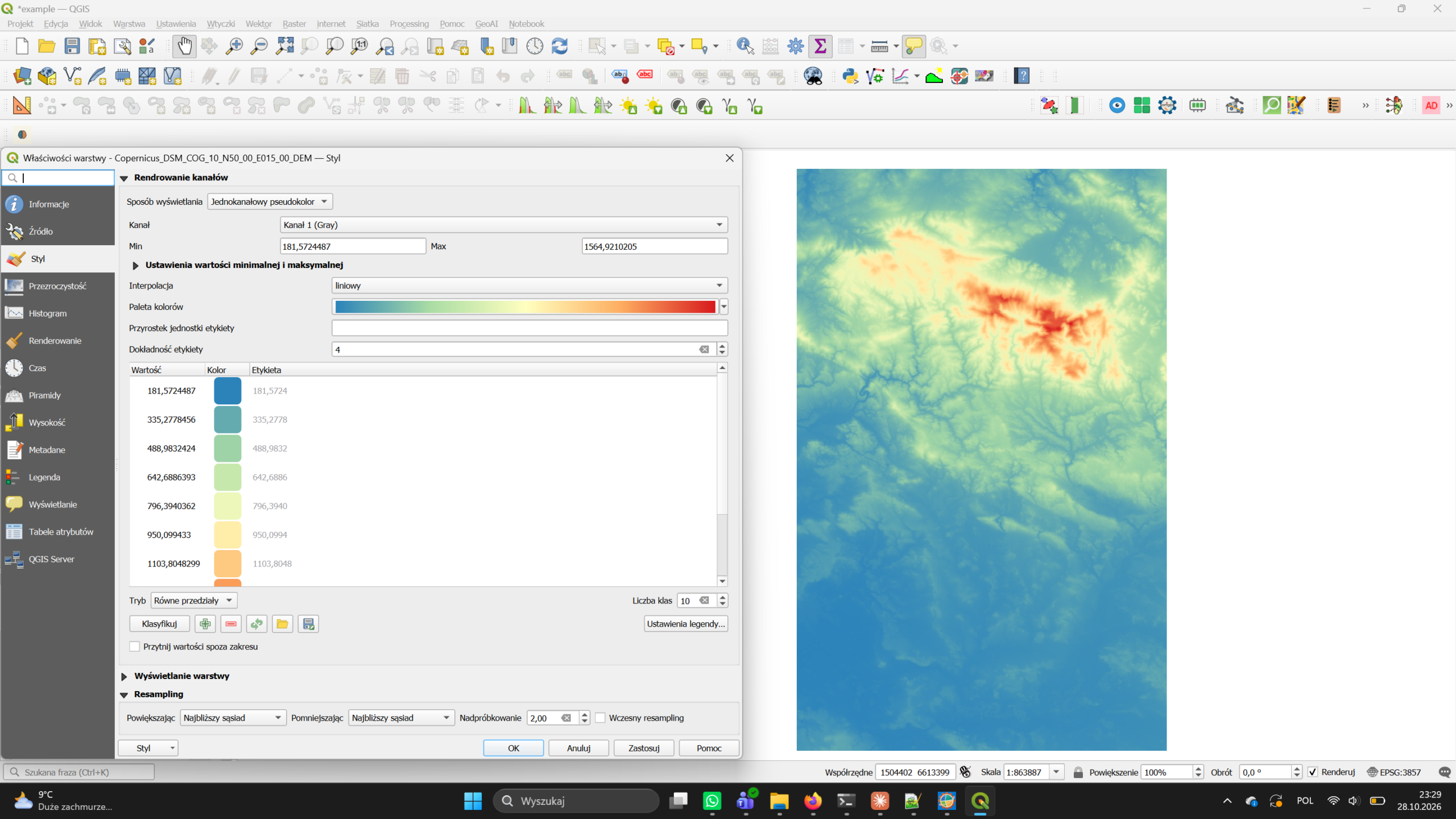
Copernicus DEM GLO-30, tile N50 E015 (© DLR e.V. 2010–2014 and © Airbus Defence and Space GmbH 2014–2018, provided under COPERNICUS by the European Union and ESA).
How it compares on paper
The RustGIS documentation includes its own comparison with QGIS and ArcGIS Pro. It is the developer’s description of their software, so read the RustGIS column as a claim.
| RustGIS 0.4 | QGIS | ArcGIS Pro | |
|---|---|---|---|
| Platform | |||
| Licence | Apache-2.0, free | GPL-2.0+, free | Proprietary |
| Runs on | Windows, macOS, Linux, browser | Windows, macOS, Linux | Windows only |
| Interface | Ribbon, tabs by workflow | Toolbars and panels | Ribbon |
| Data | |||
| Formats | Broad, own readers; GDAL optional | Widest (GDAL/OGR) | Very wide, Esri formats |
| Cloud-native | GeoParquet, FlatGeobuf, PMTiles, COG over HTTP; Zarr | GeoParquet, FlatGeobuf, PMTiles, COG, Zarr | GeoParquet, COG, Zarr |
| Projections | Rasters in any EPSG; vectors in lon/lat, no full PROJ | Full PROJ | Full support |
| Databases | PostGIS, MySQL, SQL Server read-only (desktop) | PostGIS, SpatiaLite, Oracle, SQL Server | Enterprise geodatabases |
| Analysis and maps | |||
| Tools | Built-in plus 1,000+ GeoLibre/Whitebox | 1,000+ (GDAL, GRASS, SAGA) | Most complete, paid extensions |
| Print layout | Presets, legends, map series; PDF, PNG, SVG | Full composer with atlas | Full layout view |
| Web export | Single-file HTML web map, OGC API Features | Via qgis2web | None |
| Automation | |||
| Scripting | Every action is a command: CLI and Python package | PyQGIS, qgis_process | arcpy |
| Plugins | Sandboxed WebAssembly plugins, new registry | Thousands of Python plugins | .NET add-ins, Python toolboxes |
| AI | Assistant with undo; MCP server for agents | Via plugins | Copilot features |
The same page is unusually candid about where RustGIS falls short:
- Vector data is held in longitude/latitude; there is no full PROJ.
- PostGIS, MySQL and SQL Server are read-only and desktop-only.
- No versioned or multi-user editing; edits are not written back to databases.
- DWG, JPEG 2000, NetCDF and HDF need GDAL; the web app cannot write GeoPackages.
- Network datasets and advanced spatial statistics need the external tool suite or another GIS.
- Many features are first versions; there is no Python console inside the app.
What we measured
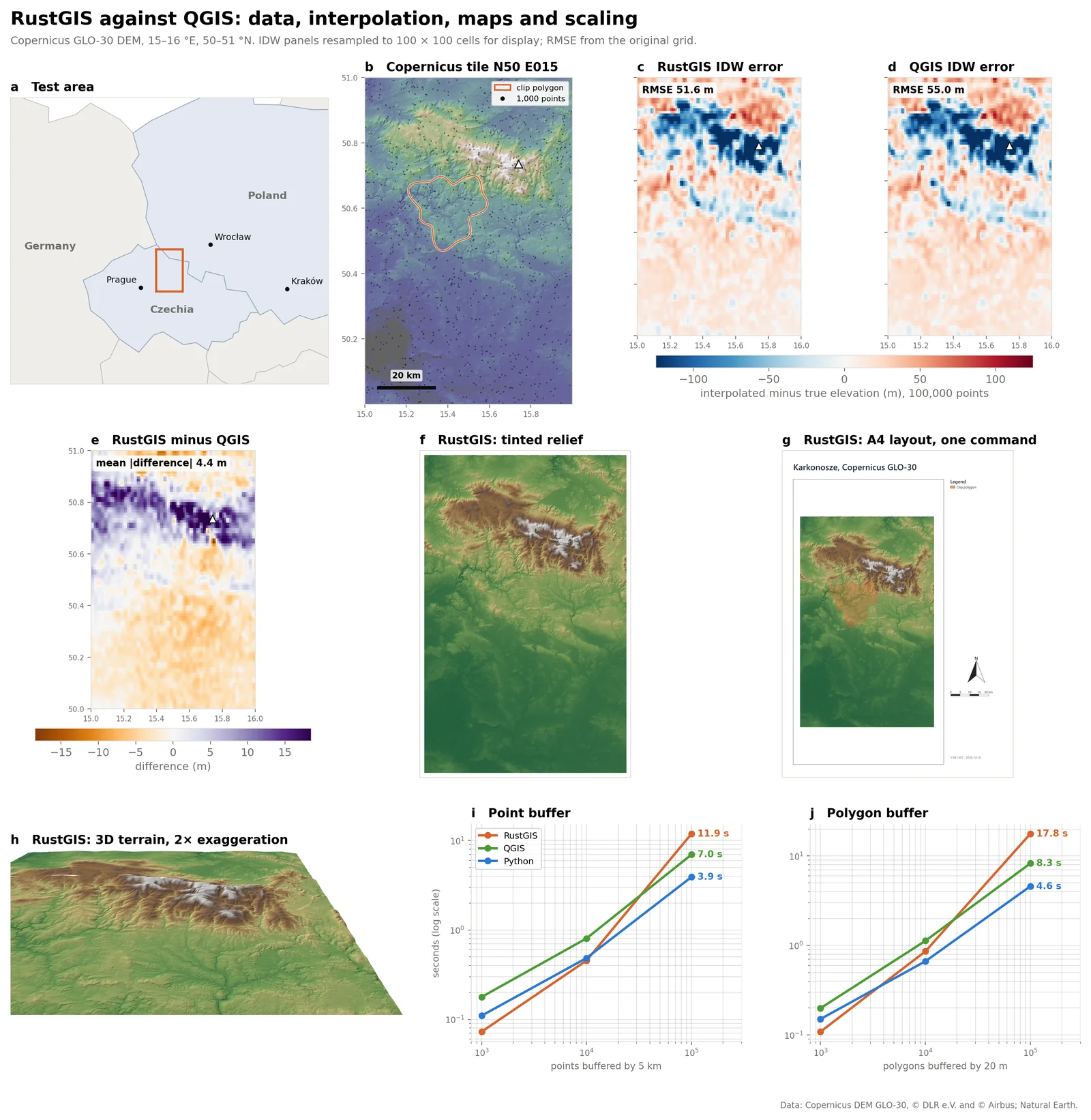
Claims of speed are easy to make, so we wrote a benchmark notebook that runs the same jobs on three engines: RustGIS 0.4.0 through its Python package, QGIS 3.34.11-Prizren through a persistent PyQGIS process (so QGIS starts once, as it does in the desktop app), and plain Python with GeoPandas, Shapely, NumPy and rasterio. Every engine reads the same files and writes the same outputs. Each case runs at least three times and we report the median. Shorter bars are faster; a tick marks the fastest engine.
Cold start: time to a ready engine
A fresh process starts and loads its GIS engine; median of five starts.
Memory at start-up
Peak resident memory while starting.
Buffer 100,000 points by 5 km
Read a GeoPackage, buffer every point, write a GeoPackage.
Slope of a 30 m DEM (8.9 million cells)
Same DEM and Horn method in every engine. GeoLibre is the tool suite RustGIS ships.
IDW, 100,000 points
On a 0.01° grid RustGIS refuses this job as “too much work”; on 0.02° it finishes. Python reproduces each engine’s distance method.
Draw 100,000 buildings, zoomed to 4 × 3 km
Almost every footprint is off-screen. QGIS and Python only read what is visible.
Export an A4 map at 300 dpi
Hillshade, AOI, title, legend, scale bar and north arrow.
Read and write 100,000 polygons as GeoParquet
This QGIS build had no Parquet driver, so QGIS is missing here.
Run the same small job 100 times from a script
A loop over QGIS’s command-line tool pays QGIS start-up on every call.
Reference run on Windows, 16 logical cores, 33.6 GB RAM, RustGIS 0.4.0, QGIS 3.34.11-Prizren. DEM: Copernicus DEM GLO-30, tile N50 E015 (Karkonosze), 2,389 x 3,722 cells in UTM 33N. Absolute times depend on hardware; the ratios between engines carry over better.
What the numbers say
Starting RustGIS costs almost nothing. Loading the engine and creating an empty project took 0.15 s and 16 MB of memory, against 3.16 s and 169 MB for PyQGIS and 1.88 s and 122 MB just to import the Python GIS stack. It is the clearest confirmation of the project’s “fast and small” pitch, and it matters for scripts, notebooks and servers that start many short jobs.
Buffering slows down sharply at scale. Up to 10,000 features RustGIS keeps pace with QGIS and GeoPandas. From 10,000 to 100,000 its buffer time grows about 26 times (an exponent of 1.42, where 1 means proportional), against roughly ten times for the other two. The cause sits in the buffer step itself, not in reading or writing files, which suggests an algorithmic issue the developers can fix.
RustGIS chooses geodesic methods, and they are measurably different. Its buffers are built on the ellipsoid and its IDW uses great-circle distance, where QGIS works in map units. Interpolating 100,000 DEM-sampled points, the geodesic IDW was closer to the real terrain (RMSE 51.6 m against 55.0 m for QGIS, a gain of 6.1 %; small, but consistent). Measured against a true 5 km circle, its buffers are 0.29 % too small, against 0.57 % for QGIS’s planar buffers in UTM.
QGIS is hard to beat on raster work. With QGIS already running, its GDAL-based slope, hillshade and GRASS flow accumulation were the fastest in our tests. RustGIS’s slope time grows in step with raster size, so its raster engine has no scaling problem, but it ran five to seven times slower than GDAL at every size we tried. Its built-in slope matches QGIS on 99.9 % of cells; the differences sit only on the first cell next to nodata.
Drawing is fast, but RustGIS draws what you cannot see. RustGIS rendered 1,000 and 10,000 building footprints faster than QGIS. Zoomed into a 4 × 3 km window of 100,000 buildings, though, it took as long as for the whole area, while QGIS and Python only read the footprints in view. Rendering the DEM from a cloud-optimised GeoTIFF instead of a plain one made QGIS about 1.6 times faster and RustGIS only about 1.1 times, which suggests RustGIS is not yet taking full advantage of COG overviews.
Input, output and scripting are where it shines. RustGIS was the fastest of the three at writing an A4 map at 300 dpi, at reading and writing 100,000 polygons as GeoJSON and as GeoParquet, and at running the same small job 100 times from a script. A loop over QGIS’s command-line tool pays QGIS start-up on every call and took more than fifteen times as long.
The core is fast where Rust is expected to be fast: start-up, file input and output, scripting. The algorithms behind buffering, raster processing and rendering are still catching up.
Our reading of the benchmark
Try it in a minute
The quickest route needs no install at all: the web app at web.rustgis.app is the full program compiled to WebAssembly. On the desktop, winget install OpenGeos.RustGIS (Windows) or brew install --cask opengeos/rustgis/rustgis (macOS) installs the app and its command line. In Python 3.12 or later:
pip install rustgis
import rustgis
s = rustgis.Session(sample=True)
s.run("gp.run", tool="buffer", params={"input": "Cities", "distance": 100})
s.to_png("map.png")
The command line renders maps headless, and registers RustGIS as an MCP server so agents such as Claude Code, Cursor and VS Code can run GIS commands:
rustgis-cli render dem.tif dem.png
claude mcp add rustgis -- rustgis-cli mcp --sample
Where RustGIS stands
Three weeks after its first release, RustGIS is not a QGIS replacement and does not claim to be. It is a credible second architecture for open-source GIS, with a different set of trade-offs.
Already useful for
- Quick looks at data. Opens GeoParquet, COG and GeoPackage in place, in the browser if needed.
- Teaching and workshops. The web app runs on any laptop with no install and no admin rights.
- Scripted maps. One command builds a layout with legend, scale bar and locator; the CLI renders maps headless.
- Agent workflows. An MCP server lets AI agents run GIS commands with undo.
Not ready for
- Projection-heavy work. Vector data is held in lon/lat without full PROJ.
- Large vector processing. Buffering 100,000 features took 1.7 times as long as QGIS in our tests.
- Shared editing. No multi-user or versioned database editing.
- Plugin-dependent workflows. QGIS has thousands of plugins; RustGIS has a new registry.
Worth watching
- Release pace. Four feature releases in thirteen days; we will track whether that holds and whether quality keeps up.
- The renderer. The GPU backend was still marked beta in v0.3.0, and it does not yet skip off-screen features or lean on COG overviews.
- Sandboxed plugins. WebAssembly plugins run with explicit permissions on the desktop, the CLI and the web.
- Contributors. The citation lists five authors; a wider maintainer base would reduce the bus factor.
For the geospatial community, the more interesting question may not be whether RustGIS overtakes QGIS, but what it shows is now possible: a full desktop GIS, with layouts, 3D, cloud-native data and a scripting interface, built in weeks on a modern stack that runs equally on a laptop and in a browser tab. If its algorithms catch up with its architecture, RustGIS will be a serious option for lightweight and web-first GIS work.
Sources
- RustGIS repository and README
- RustGIS releases
- rustgis on PyPI (release dates)
- RustGIS comparison with GeoLibre, QGIS and ArcGIS
- RustGIS Python documentation
- It’s FOSS: RustGIS is a desktop GIS tool that also runs in a browser
- Copernicus DEM GLO-30
Benchmark: eleven tests on identical, seeded inputs (buffering, IDW, slope, hillshade, flow accumulation, raster clipping, rendering, map export, batch scripting, file formats).
Did you like this post? Read more and subscribe to our monthly newsletter!


#GeoDev


Next article
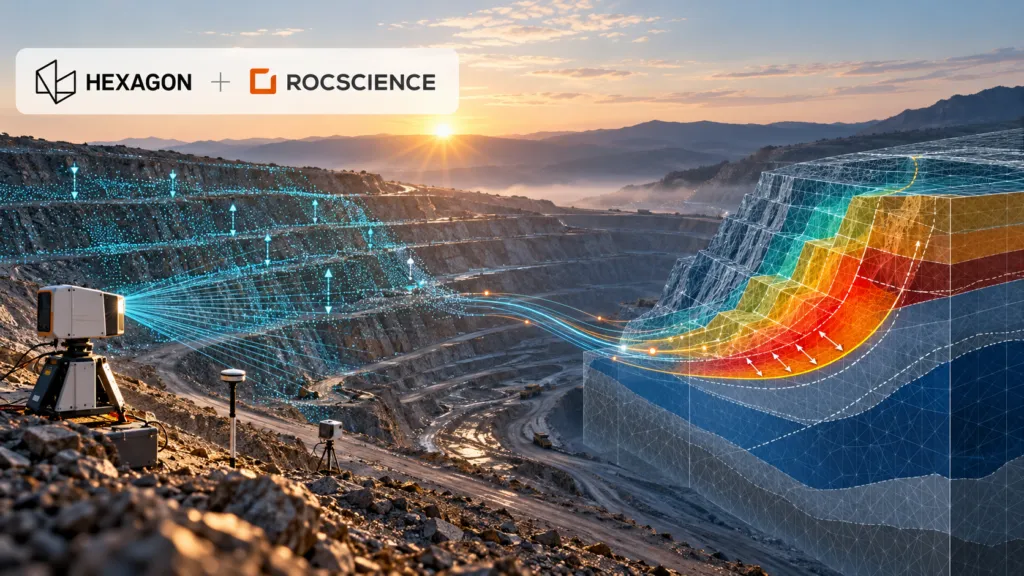

Hexagon has agreed to acquire geotechnical software specialist Rocscience for $535 million. The headline is another sizeable industrial-software transaction. The more important story is what Hexagon is trying to connect: continuous measurements of the physical world with models that predict how rock, soil and infrastructure will behave.
If that connection works, it could make geotechnical digital twins far more operational. If it does not, Hexagon will have paid a premium for an established software portfolio without resolving the difficult engineering, liability and interoperability questions between observation and prediction.
A premium price for trusted engineering software
Rocscience develops software for slope stability, finite-element analysis, tunnels, foundations, groundwater and related engineering problems. Its products include Slide2, Slide3, RS2 and RS3, and the company says customers use its software in about 125 countries.
According to Hexagon’s announcement, Rocscience is expected to approach $50 million in 2026 revenue, with more than 80% coming from annual recurring revenue and EBITAC margins above 40%. The $535 million enterprise value therefore represents roughly 10.7 times expected revenue. That is a substantial multiple, even for a profitable software company with sticky engineering workflows.
The deal is expected to close in the fourth quarter of 2026. Rocscience will join the Radar & Monitoring Division inside Hexagon’s Infrastructure & Geospatial business.
That organisational placement is revealing. Hexagon is not putting Rocscience beside generic design software. It is placing predictive modelling next to the instruments and platforms that observe ground movement.
The integration story did not begin with the acquisition
Hexagon describes a future in which sensor data automatically updates and calibrates engineering models. That remains a company claim, not a demonstrated end-to-end production capability. But the relationship has technical history.
Rocscience and Hexagon-owned IDS GeoRadar began integrating deformation-monitoring data in 2018. By 2019, engineers could bring live radar data into Slide3 and RS3. A later integration allowed Slide3 safety maps to be viewed with displacement information inside the IDS Guardian monitoring environment. The stated goal was already a “monitoring-to-modeling” workflow.
The acquisition therefore converts an existing partnership into a controlled product stack. Hexagon’s GeoMonitoring Hub can already combine radar, total-station, GNSS and third-party sensor data. Rocscience adds the analytical layer used to test possible failure surfaces, stress conditions and ground behaviour.
For an open-pit mine, the potential value is clear. Radar may detect accelerating movement on a slope, while a geotechnical model helps engineers interpret what that movement means under different geological and groundwater assumptions. Reducing the manual exchange between these systems could shorten the time between detection, interpretation and intervention.
Competition is already building connected subsurface platforms
Hexagon is not entering an empty market. Bentley’s Seequent business connects geological data and interpretation with GeoStudio and PLAXIS analysis through Seequent Central. Itasca competes in advanced geomechanical simulation with FLAC3D, 3DEC and related tools. In mine monitoring, Orica’s GroundProbe combines slope-stability radars with its MonitorIQ analysis platform and specialist services.
Rocscience has also been building its own broader platform. Since partnering with TA Associates in 2023, it has acquired DIANA for nonlinear structural analysis, 3GSM for rock-mass characterisation and blast analysis, 2SI for structural engineering, Rockfield for geomechanics, and Aquanty for surface-water and groundwater modelling.
Hexagon is consequently buying more than four familiar geotechnical applications. It is acquiring the beginnings of a multi-disciplinary engineering platform with access to structural, geological and hydrological workflows.
The hard part is governing the feedback loop
A live model is not automatically a reliable model. Sensor measurements contain noise and gaps. Numerical models depend on assumptions about materials, groundwater, geometry and boundary conditions. Automatically recalibrating a model can create false confidence if engineers cannot trace which observations changed which parameters.
That makes auditability critical. Customers will need version histories, uncertainty reporting, human approval gates and clear responsibility for automated recommendations. They will also want to know whether Hexagon will preserve support for third-party sensors and open data exchange, or use the acquisition to favour its own hardware.
Public practitioner reaction so far offers little independent guidance. Rocscience’s LinkedIn announcement attracted enthusiasm, but discussion was overwhelmingly congratulatory. Broader geotechnical forums show that engineers value Rocscience’s usability while relying on alternatives such as PLAXIS, GeoStudio and Itasca for different modelling requirements. That diversity matters because safety-critical modelling benefits from independent methods and cross-checks.
Hexagon has a credible technical rationale and an unusually clear integration starting point. What it has not yet shown is a delivery roadmap, pricing strategy or operational evidence that continuous sensor-to-model feedback improves decisions at scale.
At $535 million, that proof is now the central test of the deal.